Posts

Run program at windows start

Run key (machine) Programs listed in the registry’s HKLM\Software\Microsoft\Windows\CurrentVersion\Run key are available at startup to all users. Run key (user) Programs listed in the HKCU\Software\Microsoft\Windows\CurrentVersion\Run key run when the current user logs on. A similar subkey, HKCU\Software\Microsoft\Windows NT\CurrentVersion\Windows\Run, can also be used. Load value Programs listed in the Load value of the registry key HKCU\Software\Microsoft\Windows NT\CurrentVersion\Windows run when any user logs on. Scheduled tasks The Windows task scheduler (see “Using the Windows 7 Task Scheduler” on page 779) can specify tasks that run at startup. In addition, an administrator can set up tasks for your computer to run at startup that are not available for you to change or delete. Win.ini Programs written for 16-bit Windows versions can add commands to the Load= and Run= lines in the [Windows] section of this startup file, which is located in %SystemRoot%. The ...

Portable Executable File Format (PE)

Image
Structure of a Portable Executable (source : http://www.csn.ul.ie/) The MS-DOS header occupies the first 64 bytes of the PE file. A structure representing its content is described below: Offset (hex) Meaning 00-01 0x4d , 0x5a. This is the "magic number" of an EXE file. The first byte of the file is 0x4d and the second is 0x5a . 02-03 The number of bytes in the last block of the program that are actually used. If this value is zero, that means the entire last block is used (i.e. the effective value is 512). 04-05 Number of blocks in the file that are part of the EXE file. If [02-03] is non-zero, only that much of the last block is used. 06-07 Number of relocation entries stored after the header. May be zero. 08-09 Number of paragraphs in the header. The program's data begins just after the header, and this field can be used to calculate the appropriate file offset. The header includes the relocation entries. Note th...

ASP.NET Server Controls Tutorial

Image
In this tutorial, you will learn how to build an ASP.NET server control by creating a Hello World Control. Along the way, we'll review the fundamental process of server control development from scratch. Creating a Custom Control Project First, we need to create a new class library project to hold our custom controls. By creating the custom control in a separate class library, we can compile the project into a separate DLL and use the custom control in any application that requires it. Open your ASP.NET project with Visual Studio or Visual Web Developer. In Solution Explorer, right click the solution name, and select Add New Project from the context menu. In the Add New Project dialog box, choose the project type to be a Web project, and select ASP.NET Server Control as the template, like so:

5 Ways to handle button click event in android

Image
When writing software very rarely is there only one way to do this things,this is true when wiring up View events,five methods are shown here. 1.U sing   Member   Class public   class  main  extends  Activity  {     @Override      public   void  onCreate ( Bundle savedInstanceState )   {          super . onCreate ( savedInstanceState ) ;         setContentView ( R. layout . main ) ;          //attach an instance of HandleClick to the Button         findViewById ( R. id . button1 ) . setOnClickListener ( new  HandleClick ( ) ) ;      }           private   class  HandleClick  implements  OnClickListener {          public   void  onClick ( View  arg0 )   {    ...

Simple File System Watcher in C#

Image
In this article I describe the usage of the FileSystemWatcher controller provided by .Net Framework , using C# More information about FileSystemWatcher In C# is here.. Source Code :

Android Activity Animation Tutorial

Image
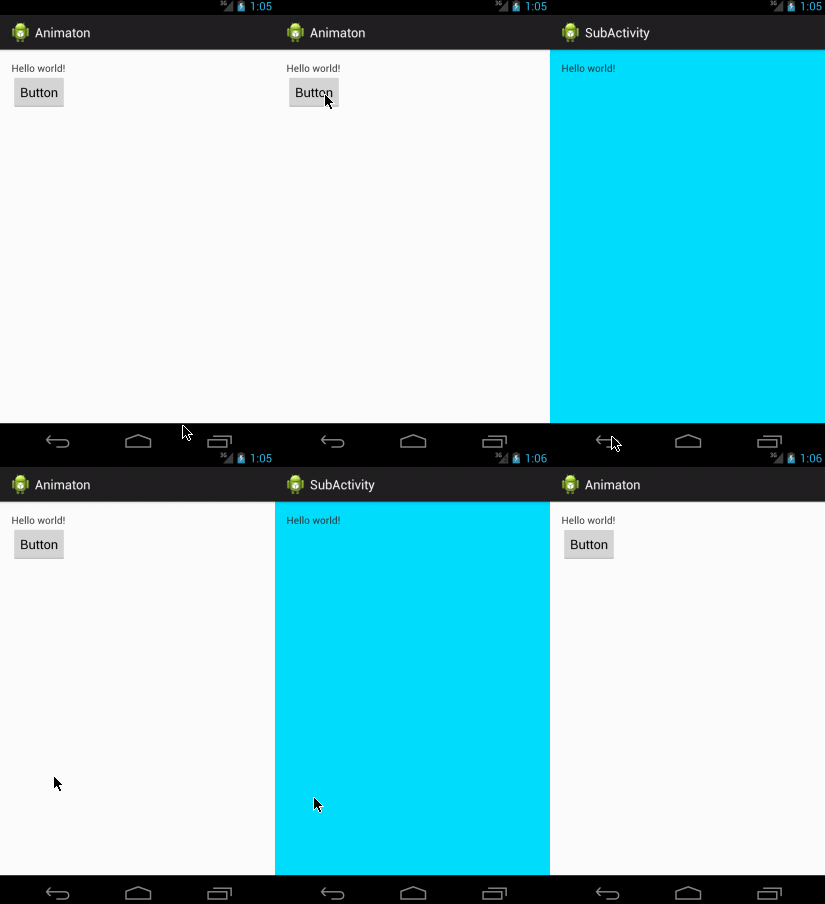
In this tutorial you can learn how to animate two activities like android navigation drawer style. Android two activity animation like navigation drawer. First of all create 2 activities. MainActivity SubActivity Then 2 XML Files (simple way two xml enough,but we need another two xml to accomplish reverse animation) slide_in_left.xml slide_out_left.xml

Project IGI -I am going in Free Download

Image
Project IGI:1 I am going in - Free Download Full Rip 229 Mb Download from here size:  229 MB (240,114,579 bytes) password : devoptions.blogspot.com