Posts

Showing posts with the label Windows 7

Easy Windows Password Recovery with Ophcrack live USB

Recovering Windows Passwords coulnd’t be easier with Ophcrack Live on USB. Whether it’s your sister’s forgotten XP account or [insert other legit reason] a little USB booting and Rainbow Table loving’s got you covered. Preparing an Ophcrack USB key is as simple as formatting your drive for FAT32 with the HP USB format tool . Downloading and launching USBOphcrack.exe and running the included batch file. The program will download a small set of rainbow tables and prepare your USB drive. For even higher password recovering accuracy I recommend finding a larger set of Ophcrack compatible rainbow tables .
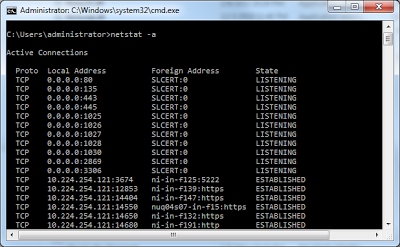
How to view open ports in windows pc

Image
Open Command prompt : Step 1. Press these key-combination to open run dialog Ctrl+R  Step 2. Type "cmd" (without quotes) command to open command prompt [DOS prompt] cmd  Step 3. Type "netstat -a" (without quotes) netstat -a To get help about this command type netstat /? or netstat help

Vmware ubuntu 12.04 - windows 7 networking

Virtual machine settings : ------------------------- Network adapter - Host Only IPv4 Settings - Method Automatic DHCP IPv6 Settings -  Method Automatic Host-PC --------- Select your network adapter  eg: Celcome3G BroadBand Right click - > properties -> goto Sharing-> select  Allow to other network  users to connect through this computer's internet  connection. Then select vmware network adapter VMNet1. Then Press OK.

How to enable hidden administrator account in windows 7 - Vista

Image
First you’ll need to open a command prompt in administrator mode by right-clicking and choosing “Run as administrator” (or use the Ctrl+Shift+Enter shortcut from the search box) Now type the following command: net user administrator /active:yes  You should see a message that the command completed successfully. Log out, and you’ll now see the Administrator account as a choice.

Run Windows utilities with RUNDLL32.EXE in windows 7

RUNDLL32.EXE , Add/Remove Programs RunDll32.exe shell32.dll,Control_RunDLL appwiz.cpl,,0 Content Advisor RunDll32.exe msrating.dll,RatingSetupUI Control Panel RunDll32.exe shell32.dll,Control_RunDLL Delete Temporary Internet Files: RunDll32.exe InetCpl.cpl,ClearMyTracksByProcess 8 Delete Cookies: RunDll32.exe InetCpl.cpl,ClearMyTracksByProcess 2 Delete History: RunDll32.exe InetCpl.cpl,ClearMyTracksByProcess 1 Delete Form Data: RunDll32.exe InetCpl.cpl,ClearMyTracksByProcess 16 Delete Passwords: RunDll32.exe InetCpl.cpl,ClearMyTracksByProcess 32 Delete All: RunDll32.exe InetCpl.cpl,ClearMyTracksByProcess 255 Delete All + files and settings stored by Add-ons: RunDll32.exe InetCpl.cpl,ClearMyTracksByProcess 4351 Date and Time Properties RunDll32.exe shell32.dll,Control_RunDLL timedate.cpl Display Settings RunDll32.exe shell32.dll,Control_RunDLL access.cpl,,3 Device Manager RunDll32.exe devmgr.dll DeviceManager_Execute Folder Options - General ...