Posts

Showing posts with the label Visual Studio 2008

C++ Hello World In Visual Studio

Without using namespace std; when you write for example cout int main() { std::cout

DllImport in C# vs VB.NET (unmanaged DLL Import)

The following code example shows how to use the  DllImportAttribute  attribute to import the Win32  MessageBox  function. The code example then calls the imported method. C# using System; using System.Runtime.InteropServices; class Example { // Use DllImport to import the Win32 MessageBox function. [DllImport( "user32.dll" , CharSet = CharSet.Unicode)] public static extern int MessageBox(IntPtr hWnd, String text, String caption, uint type); static void Main() { // Call the MessageBox function using platform invoke. MessageBox( new IntPtr(0), "Hello World!" , "Hello Dialog" , 0); } }

How to open visual studio 2010 projects in visual studio 2008 (downgrade from VS 2010 to VS 2008)

1.Make back up of your .sln file   2.Open the .sln file corresponding to the Project to be converted with Notepad   Locate the following line: Microsoft Visual Studio Solution File, Format Version 11.00 Replace 11.00 with 10.00 3.Locate the following line: # Visual Studio 10 4.Replace 2010 with 2008 5.Save the File 6.Delete the .cache files existing in the following paths: * obj/debug * obj/release 7.Open the project with Visual Studio 2008 8.Build the project with Visual Studio 2008

.NET Framwork Tools

Image
Develop, configure, and deploy applications by using Microsoft .NET Framework technologies http://msdn.microsoft.com/en-us/library/d9kh6s92(v=vs.90) [MSDN LINKS] Configuration and Deployment Tools Debugging Tools Security Tools General Tools SDK Command Prompt Assembly Linker (Al.exe) ASP.NET Compilation Tool (Aspnet_compiler.exe) ASP.NET Merge Tool (Aspnet_merge.exe) ASP.NET Browser Registration Tool (Aspnet_regbrowsers.exe) ASP.NET IIS Registration Tool (Aspnet_regiis.exe) ASP.NET SQL Server Registration Tool (Aspnet_regsql.exe) Windows Forms ActiveX Control Importer (Aximp.exe) Code Access Security Policy Tool (Caspol.exe) Code Generation Tool (SqlMetal.exe) Software Publisher Certificate Test Tool (Cert2spc.exe) Certificate Manager Tool (Certmgr.exe) Certificate Verification Tool (Chktrust.exe) Runtime Debugger (Cordbg.exe) CorFlags Conversion Tool (CorFlags.exe) Assembly Binding Log Viewer (Fuslogvw.exe) Global Assembly Cache Tool (Gacutil.exe) MSIL Assembler (Ilasm.exe...

Howto Speedup Visual Studio Toolbox initialization

Turn off AutoToolboxPopulate in Tools->Options->Windows Forms Designer->Tools . work with vs(2008/2005)

How to Speed Your Cording time with Class Diagram in Visual Studio

Image
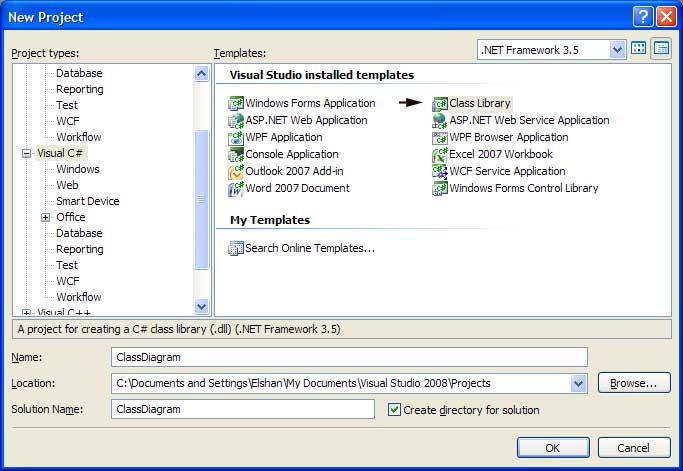
Ex : Create New Dynamic link library with Visual Studio Now we Create this type of class using Visual Studio in Graphical mode(Note cording Works use) 1: using System; 2: using System.Collections.Generic; 3: using System.Linq; 4: using System.Text; 5:   6: namespace ClassDiagram 7: { 8: public class Class1 9: { 10: private int intCounter; 11: private int strValues; 12: private int strName; 13:   14: public event EventHandler CusterAdded; 15: 16: public int getName 17: { 18: get 19: { 20: throw new System.NotImplementedException(); 21: } 22: set 23: { 24: } 25: } 26:   27: public int setName 28: { 29: get 30: ...